
Official guidance checked: 6 October 2026 | Compiled by Samuel Uzochukwu Agbaraji | Rechecked on: 17 October 2026.
A scholarship application can look finished even when an important task is still incomplete. Your answers may be ready, but a referee has not received the request. A transcript may be attached, but it belongs to an earlier course. For example, you may describe a useful project without explaining your own contribution.
The question to keep asking is simple: can a reviewer connect each important claim to the scholarship criteria and to evidence that supports it?
This guide begins once you have found an award and read its eligibility rules. It helps you organise the application, choose evidence, manage documents and references, and confirm submission. The worksheets and fictional example below turn those tasks into a process you can use for your own award.
Keep the provider’s current instructions beside you throughout. The suggested timetable is a planning tool, and the worked example is an illustration. Neither replaces an award’s rules or guarantees selection.
Understand the scholarship application requirements
Make a short brief before you draft
Save the official guidance for the correct application cycle. Record the page address and the date you checked it, then note which instructions apply to your course and study level.
UCAS’s scholarship guidance for UK students advises applicants to gather documents, check deadlines, begin early and tailor each application to the scholarship’s criteria.
Turn the provider’s instructions into a brief you can read in a few minutes:
| Item | What to record |
|---|---|
| Award and cycle | Official name and relevant study year |
| Eligibility | Required conditions and any exclusions |
| Selection | Published criteria used to assess candidates |
| Questions | Exact prompts and word or character limits |
| Documents | Required evidence, format and submission route |
| References | Who qualifies, who submits and by when |
| Timing | Application, nomination and document deadlines |
| Award conditions | Value, payment, renewal and future duties |
Resolve conflicting instructions
If the scholarship page and portal give different limits or dates, save both and ask the provider which applies. Quote the conflicting wording so the team can answer the actual problem.
Use the official contact route. Keep the reply with your application records, particularly if it changes what you must submit. A general article can explain a process, but only the provider can clarify its own requirement.
Separate eligibility from selection criteria
Confirm that your application can be considered
Eligibility rules decide whether you qualify to enter. They may concern residence, nationality, course, study mode, qualifications or funding arrangements.
Selection criteria explain what the provider values when comparing eligible applicants. For example, an award may assess academic ability, leadership, service or a proposed research project.
Make two separate lists. For example, a minimum grade belongs in the eligibility list. A project that shows research potential belongs in the selection list. This keeps you from spending most of an answer proving something the transcript already shows.
Mark each eligibility condition as confirmed, evidence needed or unclear. Beside it, record where the confirmation comes from.
Ask a question that identifies your circumstances
Suppose a residence rule is unclear. Asking whether international students can apply may produce an answer that does not resolve your situation.
A more useful enquiry is:
I am applying for [award and cycle] for [course and intake]. The residence condition says [exact wording]. I lived in [country] from [date] to [date] and then moved to [country] for [reason]. Does this meet the condition, and what evidence should I provide?
Use your actual details and the provider’s secure process for any supporting documents. Do not treat an unanswered enquiry as permission to ignore a required condition.
Build a scholarship application evidence map
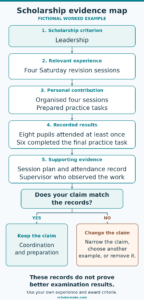
Fictional leadership example linking personal contribution, recorded results and supporting evidence.
An evidence map connects a criterion, an experience and a source that can support your account. It also reveals gaps while you still have time to address them.
The diagram uses the fictional revision session example explained in the next section. Use it as an overview, then complete the table for your own award.
Start with the exact published criteria. Then complete one row for each:
| Criterion | Relevant experience | Your contribution | Result or lesson | Supporting source |
|---|---|---|---|---|
| Academic ability | Project or research | Analysis or work you completed | Finding, grade or skill | Transcript or project record |
| Leadership | Team or community task | Decision or action you took | Change or problem addressed | Referee or activity record |
| Subject commitment | Work, study or volunteering | Relevant responsibility | Knowledge gained | CV, portfolio or supervisor |
| Future contribution | Problem you want to address | Realistic next step | Intended benefit | Course research and career plan |
These are suggested categories, not requirements shared by every scholarship. Replace them with the criteria for your award. Keep the supporting material in your private preparation folder. However, submit only what the provider requests or permits.
If the evidence does not support a claim, choose one of these actions:
- Narrow the claim: Describe the action or result your records actually support.
- Choose another example: Use a relevant experience with clearer supporting evidence.
- Remove the claim: Delete details you cannot support.
Before keeping an example, check that it answers the question and fits a published criterion.
Turn an experience into clear evidence
A fictional example: organising revision sessions
Consider a fictional applicant who helped organise four Saturday revision sessions for eight pupils. This example illustrates evidence checking. It is not a real applicant’s story or an answer to copy into a form.
The applicant’s first note reads:
I transformed pupils’ achievement through outstanding leadership.
That note leaves several questions unanswered. What did the applicant do? Did pupils’ performance improve? Which record supports the claim about achievement? An evidence review might produce this:
| Part of the account | Detail the fictional applicant can support |
|---|---|
| Responsibility | Organised four sessions and prepared practice tasks |
| Collaboration | Asked two other tutors to help deliver the sessions |
| Participation | Eight pupils attended at least one session |
| Recorded result | Six pupils completed the final practice task |
| Supporting material | Session plan, attendance record and a supervisor who observed the work |
A clearer version of the applicant’s account
Using the available evidence, the applicant could now write:
I helped organise four Saturday revision sessions and prepared practice tasks for the pupils. I also asked two other tutors to help deliver the sessions. Eight pupils attended at least one session, and six completed the final practice task.
This version tells the reader what the applicant actually did and what was achieved. It shows organisation, teamwork and participation without exaggerating the results. However, the applicant cannot claim that examination performance improved because there is no evidence to support that conclusion.
Keep results within the limits of your records
Completing an activity, reaching people and improving performance are different results. Therefore, name the result you can support.
If you worked in a team, explain your responsibility and acknowledge the shared work. If you lack a reliable count, describe the activity without inventing one. Where the records show a difficulty, explain how you responded and what you learned.
For a future project, separate intention from achievement. “I plan to develop” describes a proposal. “I developed” describes completed work. Check the wording carefully when your application contains both.
Before keeping an example, ask:
- Which published criterion does this demonstrate?
- Was my own contribution clear?
- Can I support the result?
- Should I narrow or remove any claim?
This review gives you usable material before you spend time polishing sentences.
Match your evidence to each application question
Assign examples before writing answers
Read the main instruction in each question. For example, “describe”, “explain”, “evaluate” and “outline your plans” ask you to do different things.
Create a short answer plan with three entries: what the question asks, which example answers it, and what evidence supports that example.
If a question asks about a decision, identify the decision and your reasoning. If it asks how a course supports your plans, connect a relevant course feature to the knowledge or skill you need. For that reason, leave out achievements that do not help you make the requested connection.
You can refer to the same experience in different answers when it is relevant. However, give each answer a clear purpose and remove repeated background that does not answer another part of the question.
Keep different documents doing their own jobs
A CV records experience. A research proposal, however, explains the research you plan to carry out. Your personal statement answers its own question. Check what the provider expects from each before deciding where information belongs.
For detailed statement structure, use the scholarship personal statement guide. Here, the task is to check that the application as a whole covers the requested criteria without unnecessary repetition.
Do not copy a worked example into an application. Instead, build your answer from your own record and follow the award’s rules on help.
Organise your scholarship application documents
Keep one clear version for submission
Create a folder for the award and a separate folder inside it for the files you intend to submit. Keep working drafts elsewhere so you do not upload an older document by mistake.
Use understandable names such as:
- Surname_Transcript.pdf
- Surname_CV.pdf
- Surname_ResearchProposal.pdf
Use the provider’s file naming rules where these are specified. Include a reference file only when applicants are allowed to upload it; some providers require referees to submit directly.
Maintain a document record:
| Document | Provider’s requirement | Current position | Next action |
|---|---|---|---|
| Transcript | Official or unofficial, as stated | Requested | Check processing time |
| CV | Stated length and format | Checked | Upload final version |
| Translation | Required language and certification | Unclear | Ask admissions or provider |
| Reference | Eligible referee and submission route | Request accepted | Check receipt where visible |
After an edit, replace the file you plan to submit with the updated version. Do not leave several files labelled “final” and rely on remembering which one is correct.
Check the file as the reviewer will receive it
Open each finished file and check all pages. Look for missing text, sideways scans, unreadable marks, cut edges and pages from another document.
A file opening on your computer is only one check. In addition, open the uploaded copy if the portal offers a preview or download. Make sure it is in the correct field and remains readable after conversion or compression.
Check names, course titles and dates against the form. If your documents use different names or formats, ask what explanation or supporting record is required.
Finally, follow the stated translation and certification rules. Do not assume that your own translation, a screenshot or an unofficial transcript will satisfy a requirement for something else.
Choose and support your scholarship referees
Check eligibility and direct knowledge
Read the referee rules before choosing someone. Check whether the award requests an academic, professional or other referee. Also, check any restrictions on your relationship to them.
Then consider who knows the relevant work. A person who supervised your project may be able to describe your contribution more clearly than a senior person who barely knows you.
Ask whether the person is willing and able to provide the required reference by the deadline. If they cannot, seek another eligible referee while time remains. Do not enter someone’s details without their agreement.
Give them details they can check. For example, remind a supervisor about a project they observed, but do not ask them to confirm work they do not know.
Send a useful reference pack
Once they agree, send:
- The award name and current criteria.
- The exact reference instructions.
- Your CV and relevant course or research plan.
- A short reminder of work they directly know.
- The deadline, time zone and submission route.
A request could read:
Would you be willing to provide a reference for [award]? Its criteria include [relevant areas], and you supervised my work on [project]. The reference must reach [provider] through [route] by [deadline and time zone]. I can send the instructions and a short summary of that work.
Also, agree a sensible time for a reminder. If the portal sends an invitation, confirm that it reached the correct address and ask the referee to check spam if necessary.
Track the reference separately from your own form. Follow the provider’s instructions if a request fails or the referee becomes unavailable. Do not assume that naming a referee means the reference has been received.
Plan around scholarship application deadlines

Work backwards from all required dates
Record each deadline with its date, time and time zone. Also, check whether a university nomination, course application, referee submission or supporting document has a separate deadline. A nomination means an institution puts you forward for the award.
The following is a suggested four-week preparation plan, not a provider’s timetable:
| Period | Main task |
|---|---|
| Week 1 | Read the rules, resolve eligibility questions, request documents and ask referees |
| Week 2 | Complete the evidence map and plan answers |
| Week 3 | Prepare answers, check records and finalise documents |
| Week 4 | Complete permitted review, upload, audit and submit well before the final hours |
Move document and referee requests earlier if they need more time. However, keep every official deadline unchanged in your tracker; your own target does not replace it.
If the deadline is close
List unfinished requirements and identify who controls each one. You can revise your answer, but you cannot personally issue a transcript or provide your referee’s assessment.
Ask the provider about an unclear process promptly. Do not assume it will accept a late document or extend the deadline.
If an essential requirement cannot be completed, check whether a later round is a realistic option under the programme’s rules. Record what you would need to prepare earlier. That decision should come from the actual requirements, rather than pressure to submit something incomplete.
Check the rules on AI and outside help
Check the current policy before using an AI tool, an editor or a paid application service. A provider may distinguish between discussion, proofreading, rewriting and generating answers.
For example, Chevening’s official application guidance prohibits using AI software to generate application answers. It also asks applicants to confirm in the form that they have not used AI to generate their answers. Do not transfer another provider’s permission to a Chevening application.
If the policy is unclear, ask about the specific help you want to use. Avoid assuming that a tool is allowed because it describes itself as a grammar checker.
When review is permitted, agree what the reviewer may do before sharing your draft. For example, you could ask: “Which claim needs more supporting detail?” Then follow the provider’s limits on whether another person may edit the wording.
Keep every experience and figure truthful. Also, check factual statements against your records and consider privacy before sharing sensitive documents with an outside service. If the provider asks you to declare any help, follow its instructions.
The fictional example in this guide illustrates how to examine evidence. It does not provide an application answer for submission.
Run one final scholarship application audit
Review the content and requirements together
Use the actual form and official brief for the final review. Otherwise, checking only your saved answers can miss a required field or an instruction inside the portal.
Work through these checks once:
- Eligibility: Every required condition is met or clarified by the provider.
- Answers: Each response addresses its exact prompt and stays within its limit.
- Evidence: Important claims match your records and show your own contribution.
- Consistency: Names, dates, course details and figures agree across the application.
- Documents: The correct readable files appear in the correct fields.
- References: Requests and submissions follow the stated route and timetable.
- Assistance: Any review or AI use follows the provider’s policy.
- Submission: You know the final action required and how to check receipt.
For explanations of common errors, use the scholarship application mistakes guide.
Deal with a failed check
Write down the issue, the person or organisation that can resolve it, and the next action. For example: “Transcript incomplete; contact registry; request a complete copy.”
Do not tick a requirement because you intend to fix it later. Instead, keep unfinished items visible until you have dealt with them or received instructions from the provider.
Before submitting, save any copy or preview the provider allows. Then check whether you can make changes afterwards.
Confirm submission and manage the next stage
Save a record of what happened
For programmes it manages, Scholarship America’s application guidance advises checking for confirmation and verifying submitted status in the portal. Its guidance also says editing after submission depends on the programme.
Use the confirmation process for your own provider. Then save the application number, confirmation message and submission date where available. Check that the record refers to the intended award and cycle.
If an email does not arrive, check spam and any status page before assuming the application failed. Then contact official support if the position remains unclear. Give the application number and a short description of the problem, without sending unnecessary sensitive documents.
Keep a record of an upload or system error and when it occurred. This helps you explain the issue, although it does not guarantee extra time or acceptance.
Track requests without assuming an outcome
Monitor the email account and portal used for the application. Also, record any published interview period, result date or additional document deadline.
A submission confirmation records a stage in the process. However, an award offer is a separate decision. Likewise, where references have a separate deadline, check their status according to that timetable rather than assuming your own submission completes everything.
Keep your final application and source records together. If a provider asks about an experience or figure, you can return to the version you actually submitted.
Read the scholarship offer before accepting
An offer needs its own review. First, check what the award covers and what the provider requires you to do next.
Record:
- Whether the support is a tuition reduction, cash payment or another benefit.
- The amount and the years or study periods covered.
- Payment dates and any costs due before payment.
- Course, enrolment or academic conditions.
- Renewal requirements and future duties.
- Rules on combining funding or changing your plans.
- The acceptance deadline and required action.
Ask the provider to explain any unclear term before relying on it. Also, check both providers’ rules on combining awards if another award is involved. Add the amounts only when both providers allow it.
Avoid making financial commitments that depend on unconfirmed funding. If you already hold an offer that requires a deposit, review its deadline and refund terms separately from the scholarship decision.
If you are unsuccessful, keep the useful preparation records. Where feedback is available, use it to identify a change you can make. Also, check any repeat application restrictions before planning another attempt. An unsuccessful result alone does not identify which part of the application needs changing.
Choose your next useful action
Open the guidance for one award and create the application brief. Then build the evidence map, identify the document you need to request, and contact an eligible referee.
Finally, create a short action list: task, person responsible, target date and current position. Review it when something changes, rather than starting your checks again from memory.
A strong scholarship application gives a reviewer a clear route from the question to your experience, supporting evidence and plans. You cannot control the final selection decision. However, you can control whether your application is accurate, relevant and complete under the published rules.
About the sources: UCAS, Chevening and Scholarship America guidance was checked on 6 October 2026. Named provider rules apply to those providers. The evidence worksheets, suggested timetable and fictional example are practical editorial tools, not official scholarship requirements.